How does plainDB help me review database edits?
plainDB stages table edits and shows the generated SQL before applying them. That review helps you inspect the target table, row identifier and changed values. It is an editing checkpoint, not a guarantee that a change is correct or reversible.
Try one edit on a practice database
Use this separate SQLite file before connecting to important data. It contains three invented customer records, no passwords and no server connection. Save a working copy so you can start over whenever you need.
- Add a SQLite connection in plainDB, choose the downloaded file and name the connection Practice only. Leave read-only off for this disposable exercise.
- Open customers. There should be three rows. Find Jordan Lee, id 3, whose plan is Team.
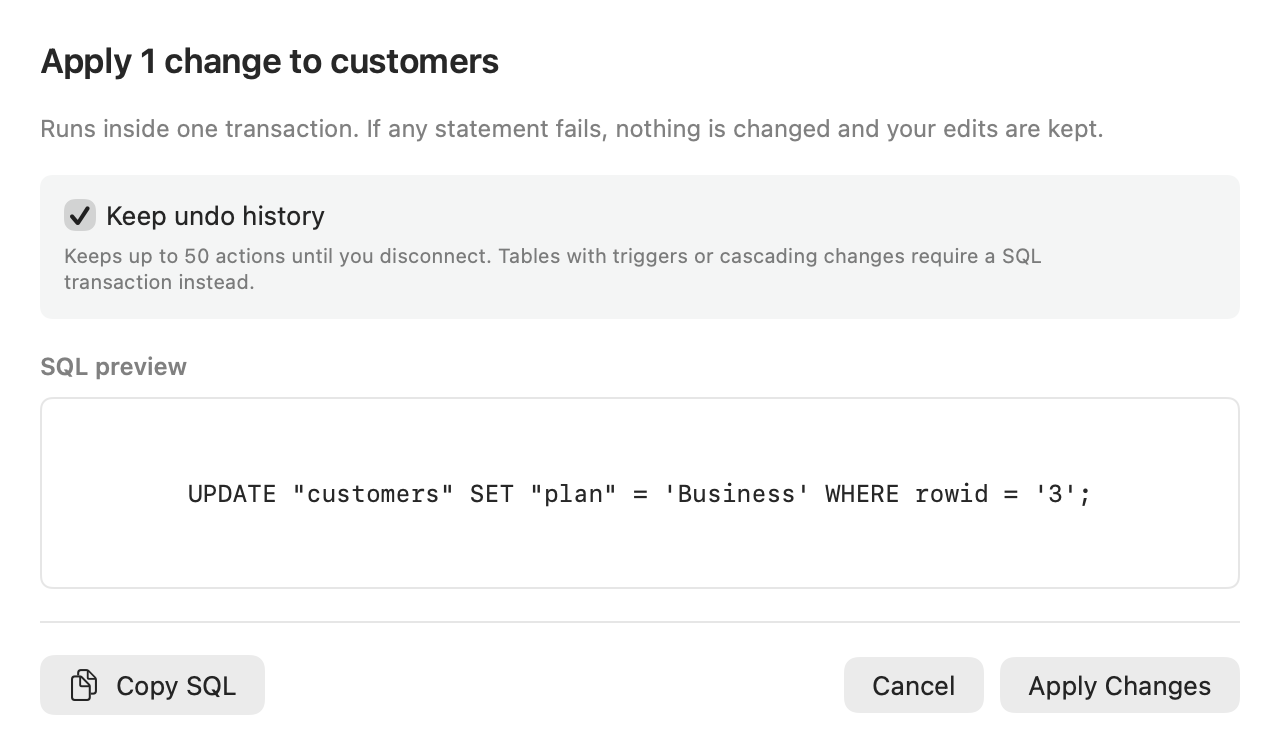
- Change that cell to Business, then open Apply Changes. Before confirming, check that the SQL updates only the plan column in customers and targets row 3. SQLite may identify this row using
rowid, which aliases this table’s integer primary key. - Cancel the review first. The database has not received the change; the edit remains staged so you can review or discard it.
- When ready, reopen the review, keep Keep undo history enabled and apply the edit. Verify the result with the read-only query below. Keep the connection open if you want to try saved row undo.
SELECT id, name, plan
FROM customers
WHERE id = 3;
Before applying, the database result is 3 · Jordan Lee · Team. After applying, it should be 3 · Jordan Lee · Business. Saved row undo should restore Team for this supported sample table. If your result differs, stop and check the active connection, row and pending edits.
What should I check before applying?
Confirm the connection and environment, the table name and the WHERE clause identifying the record. Check that only the intended columns change and that NULL and empty values mean what you expect. If the statement differs from your intention, cancel or discard the staged changes rather than applying them to see what happens.
A visible environment label helps distinguish development, staging and production connections. It is a reminder, not an access restriction. Keep separate connection names and use database credentials with the smallest permissions needed for the task.
Does every SQL statement get the same review?
No. The staged table-edit workflow is distinct from typing SQL in a query tab and pressing Run. Do not assume that arbitrary SQL or an AI-generated statement will pass through the table-edit confirmation dialog. Check whether you are running the current statement, a selection or a complete script.
Can I undo an applied row change?
Yes, for supported PostgreSQL and SQLite tables on both Mac and Windows, when undo recording is enabled in the Apply dialog and the connection is in auto-commit mode. plainDB keeps up to 50 applied batches in memory per connection. Each Apply is one undo step, including the rows inserted, updated or deleted through the grid or inspector.
Undo first reverses staged edits. Once pending edits are resolved, it can preview the latest recorded batch for that connection. Before restoring rows, plainDB checks the table definition and recorded row values. If a row or schema has changed incompatibly, recovery stops rather than overwriting that change. History is cleared when you disconnect; it does not survive an app restart.
Saved row undo does not cover arbitrary SQL, CSV imports, truncate, drop or other schema changes. Tables with triggers, cascading foreign keys or special rules can be ineligible. MySQL/MariaDB and MongoDB do not support this applied-row history. If recording is unavailable, use a manual SQL transaction where appropriate, or explicitly choose Apply Without Undo after reviewing the change.
How is Rollback different?
Mac and Windows both provide an auto-commit toggle and Commit/Rollback controls for relational query sessions. Rollback reverses work in the current uncommitted transaction according to the engine’s rules. It does not undo an earlier commit, and some database operations implicitly commit. Saved row undo is a separate, limited history of recorded grid changes.
Is read-only mode a security boundary?
The app offers read-only connection settings and disables table editing for those connections. Database permissions remain the authoritative boundary. Use a genuinely restricted database role for inspection, especially when the SQL editor is available. Session settings are not a substitute for credential-level restrictions.
Maintain a tested backup and recovery process for important data. A row export is useful for sharing a result but does not automatically capture a recoverable database. The GUI evaluation checklist includes a disposable-data exercise for testing the review workflow.